
.png)
Description
Download Audiotext Ai – Secure AI Transcription, Note‑Taking & Voice Diary
Overview of Audiotext Ai
Audiotext Ai is a cloud‑based transcription platform that turns spoken language into editable, well‑structured text in real time. Designed for students, content creators, business professionals, and anyone who frequently captures ideas verbally, the service eliminates the repetitive task of manual typing. By leveraging advanced speech‑recognition models, Audiotext Ai can handle a wide range of English accents, moderate background noise, and varying speaking speeds while maintaining high accuracy. The interface is clean and intuitive: users start a recording, watch the words appear instantly, and then apply a suite of post‑processing tools such as style presets, automatic summarisation, or a rewrite engine that polishes grammar and removes filler words. In addition to real‑time dictation, the platform supports batch uploads of pre‑recorded audio files, making it a versatile solution for both live and archived content. Security is a core focus; all data is encrypted in transit and at rest, and the service complies with GDPR, giving users confidence that their personal notes and sensitive business information remain protected. While the application requires an internet connection and currently supports only English, its cross‑platform availability on web browsers, iOS, and Android ensures that users can capture thoughts wherever they are. With a flexible subscription model that includes a free trial, Audiotext Ai offers a low‑risk way to evaluate whether AI‑driven transcription can streamline daily workflows and boost productivity.
Key Features and Functionalities
- Real‑time speech‑to‑text conversion: Instantly transforms spoken words into editable text with AI‑driven accuracy, supporting diverse English accents.
- Multiple transcription styles: Choose from verbatim, summarized, bullet‑point, or custom templates to match the purpose of your notes.
- Voice diary: A private, searchable journal that automatically saves spoken reflections and indexes them for quick retrieval.
- Rewrite & polish engine: One‑click grammar correction, filler removal, and sentence tightening for professional‑grade output.
- Export options: Native CSV export for spreadsheet analysis; copy‑and‑paste capability for PDF, DOCX, or other formats.
- Shareable note link: Generate a unique URL for each transcript, enabling effortless sharing on social media or embedding in websites.
- Cross‑platform access: Fully functional on modern web browsers, iOS, and Android devices, synchronising data via secure cloud storage.
- Secure cloud storage: TLS encryption in transit and AES‑256 at rest, with GDPR compliance for data privacy.
- Batch upload processing: Drag‑and‑drop MP3 or WAV files for asynchronous transcription, with email notifications upon completion.
- Flexible subscription plans: Monthly or annual pricing, plus a 7‑day free trial that unlocks all premium features.
Each feature has been crafted to address specific pain points in the note‑taking process. For instance, the transcription style selector eliminates the need for manual reformatting after dictation, while the rewrite engine saves hours of editing work for writers and marketers. The voice diary transforms fleeting ideas into searchable records, turning a smartphone into a personal knowledge base. By bundling these capabilities into a single, cloud‑native application, Audiotext Ai reduces the number of tools a user must juggle, thereby streamlining the overall workflow.
Installation, Setup & Daily Usage Guide
Getting started with Audiotext Ai is intentionally simple, reflecting the product’s focus on ease of use. Because the core transcription engine operates on remote servers, there is no bulky desktop client to install. Users can begin immediately via a web browser or by downloading the native mobile apps.
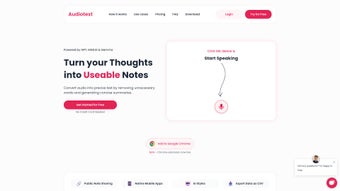
Web Access: Visit audiotext.ai, click “Sign Up,” and fill out the short registration form (name, email, password). After confirming the verification email, you are taken to a dashboard that displays a large, central recording button, a transcription pane, and a side menu for saved notes, settings, and billing.
Mobile Apps (iOS & Android): Open the Apple App Store or Google Play Store, search for “Audiotext Ai,” and tap “Install.” Upon first launch, the app requests microphone permission—grant this access to enable speech capture. Log in with the same credentials used on the web; all recordings, preferences, and voice‑diary entries sync automatically thanks to the cloud backend.
Typical Daily Workflow: Press the red record button, speak naturally into the device’s microphone, and watch the text appear line‑by‑line in the transcription pane. When you finish, stop the recording, select a transcription style from the dropdown (e.g., “Lecture” adds timestamps, “Blog Draft” formats paragraphs), and optionally click the “Rewrite” button to polish the output. Finally, click “Save” to store the note in your library, where you can export it as a CSV file, generate a shareable link, or add tags for future searchability. For frequent users, the “Quick‑Start” mode remembers the last selected style, reducing friction for repetitive tasks.
Batch Processing: If you have existing audio files, drag them onto the “Batch Upload” area, choose the language (currently English), and let the AI process each file in the background. You receive an email notification once processing is complete, and the transcripts appear under the “History” tab for immediate review or export.
Compatibility, Pros & Cons
Pros
- High transcription accuracy for English, even with moderate background noise.
- Instant real‑time conversion eliminates post‑recording typing.
- Multiple style presets adapt to academic, professional, or creative contexts.
- Secure, GDPR‑compliant cloud storage protects sensitive data.
- Cross‑platform support (web, iOS, Android) enables seamless switching between devices.
- Free trial and transparent pricing lower the barrier to entry.
- Shareable links simplify collaboration without requiring additional accounts.
- Batch upload feature handles pre‑recorded audio efficiently.
- Rewrite engine adds professional polish with a single click.
- User‑friendly interface reduces the learning curve for new users.
Cons
- No offline mode; an active internet connection is mandatory for all transcription tasks.
- Limited to English; multilingual support is not yet available.
- Subscription cost may be a deterrent for occasional or hobbyist users.
- Advanced formatting (tables, code snippets) is not supported in the native export.
- Export options are limited to CSV; PDF or DOCX require external conversion tools.
- Audio length restrictions on the free trial may limit extensive testing.
Frequently Asked Questions & Final Thoughts
Is Audiotext Ai completely free to use?
Audiotext Ai offers a 7‑day free trial that grants full access to all premium features. After the trial expires, a paid subscription is required to continue using the service.
Can I use Audiotext Ai without an internet connection?
No. The transcription engine runs on cloud servers, so a stable internet connection is required for both real‑time dictation and batch processing.
Which devices and operating systems are supported?
Audiotext Ai works on any modern web browser and offers native apps for iOS and Android. It is optimised for desktops, laptops, tablets, and smartphones.
How secure is my data when using Audiotext Ai?
All recordings and transcripts are encrypted using TLS during transmission and AES‑256 at rest. The platform adheres to GDPR standards, ensuring personal data is handled responsibly.
Can I export my notes in formats other than CSV?
CSV is the native export format. However, you can copy the transcribed text into any word processor and save it as PDF, DOCX, or other formats as needed.
Is there a limit to the length of audio I can upload?
During the free trial, uploads are limited to 30‑minute files. Paid subscribers can process files up to 2 hours in length per upload.
Conclusion & Call to Action
Audiotext Ai delivers a robust, AI‑powered transcription experience that can dramatically reduce the time spent typing notes, drafting blog posts, or preparing meeting minutes. Its real‑time accuracy, flexible styling options, and secure cloud workflow make it especially valuable for students, creators, and professionals who need fast, reliable text generation. While the current English‑only limitation and the requirement for an internet connection are notable constraints, the overall feature set, cross‑platform accessibility, and commitment to data privacy provide compelling reasons to adopt the tool for everyday productivity. If you’re ready to transform how you capture ideas and streamline your writing process, sign up for the free trial today and experience the convenience of instant, secure transcription.
Guides & Tutorials for Audiotext Ai
How to install Audiotext Ai
- Click the Preview / Download button above.
- Once redirected, accept the terms and click Install.
- Wait for the Audiotext Ai download to finish on your device.
How to use Audiotext Ai
This software is primarily used for its core features described above. Open the app after installation to explore its capabilities.
User Reviews for Audiotext Ai 0
No reviews found




